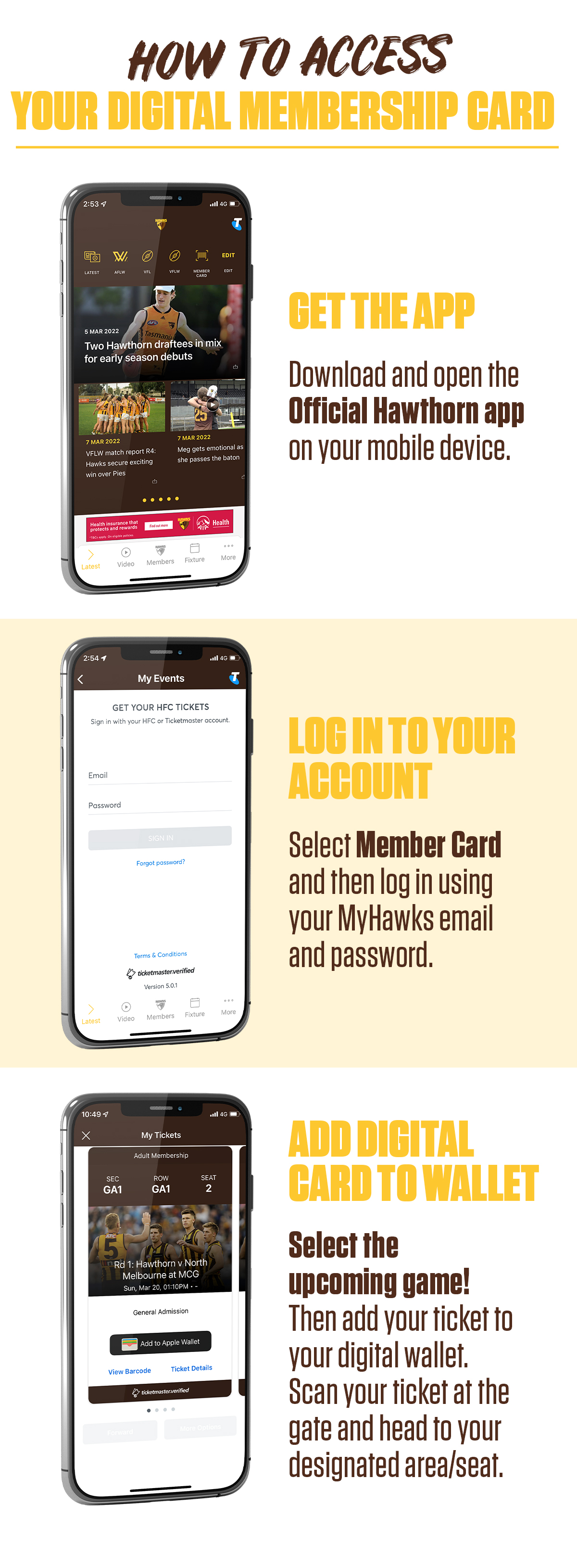
GET THE APP
Download the app on the Apple Store here.
Download the app on Google Play here.
LOG IN TO YOUR ACCOUNT
Your MyHawks login details for the Hawks App is the email address listed on your membership account and a unique password.
If you have forgotten your password, you can follow the below steps to reset your password:
- Visit the MyHawks login page
- Enter your email address and click next
- Click forgot password
- Click 'Yes, Reset Password'
- An email will be sent to you, click the 'Reset Your Password' link
- Create your new password (this must be between 6-64 characters long, with at least one number and NO symbols)
- Sign into your MyHawks account
If you have not received a password reset email this may mean we have the wrong email address linked to your account. Please contact the membership team on 1 3000 HAWKS (42957) to update your details.
ADD DIGITAL CARD TO WALLET
Your digital card will be available via the app 72 hours prior to each game. At this time you will be able to save your ticket to your phone wallet for easy access into the match.
Please note members who have upgraded to a reserved seat will be required to use the ticket issued to you by the ticketing agent.
Having issues with the App?
If you have any trouble accessing your digital membership card via the Hawthorn app, you will be able to access your card through a browser on your phone. Please follow the below instructions:
- Open a web browser on your phone
- Visit membership.hawthornfc.com.au
- Sign in with your MyHawks email address and password
- Select My Events
- Select the upcoming match.
Please note, your barcode will only become available 72 hours prior to each match.